
TL;DR:
- AI task scheduling automates repetitive tasks, saving significant business hours and increasing efficiency.
- No-code platforms like Zapier, Make.com, and n8n are ideal for starting, with enterprise tools needed for complex workflows.
- Key challenges include rate limits, scope drift, and system glitches, which require monitoring and retries for reliability.
Every week, business professionals lose hours to repetitive tasks: manually sending reports, chasing calendar updates, copying data between apps. It adds up fast. The good news is that AI task scheduling can eliminate most of this friction, giving you reliable, hands-free automation that runs while you focus on higher-value work. This guide walks you through everything you need, from choosing the right tools and setting up your first scheduled workflow, to scaling into enterprise-grade orchestration. You'll also learn the pitfalls that trip up even experienced teams, so your automations stay dependable from day one.
Table of Contents
- What you need to schedule AI tasks
- Step-by-step: Scheduling AI tasks with no-code platforms
- Scaling up: Enterprise-grade AI task scheduling and orchestration
- Common pitfalls and expert troubleshooting tips
- Why reliable AI task scheduling is easier and harder than it looks
- Get started with AI agent scheduling
- Frequently asked questions
Key Takeaways
| Point | Details |
|---|---|
| Start with no-code | No-code platforms let you automate and schedule AI tasks quickly before growing into more complex orchestration. |
| Match tools to needs | Choose scalable orchestration platforms when your tasks require reliability, governance, and complex dependency handling. |
| Plan for pitfalls | Address rate limits, scheduling glitches, and edge cases from the beginning for reliable automation. |
| Measure and optimize | Track time and efficiency savings as you scale scheduling, ensuring you’re getting strong productivity returns. |
What you need to schedule AI tasks
Before you build anything, you need a clear picture of what AI task scheduling actually requires. At its core, scheduling an AI task means connecting a trigger (something that starts the process) to an action (what the AI does), then deciding when and how often that cycle runs. The tools you pick will shape everything else.
Here's a quick breakdown of what you'll need:
- A scheduling platform: This is the engine. It handles triggers, timing, and connections between apps.
- App integrations: Think Gmail, Google Calendar, Slack, or your CRM. The more integrations available, the more flexible your workflows.
- An AI component: A language model node, an AI agent, or a built-in AI action that makes decisions within the workflow.
- A trigger type: Time-based (cron), event-based (new email received), or webhook-based (external system fires a signal).
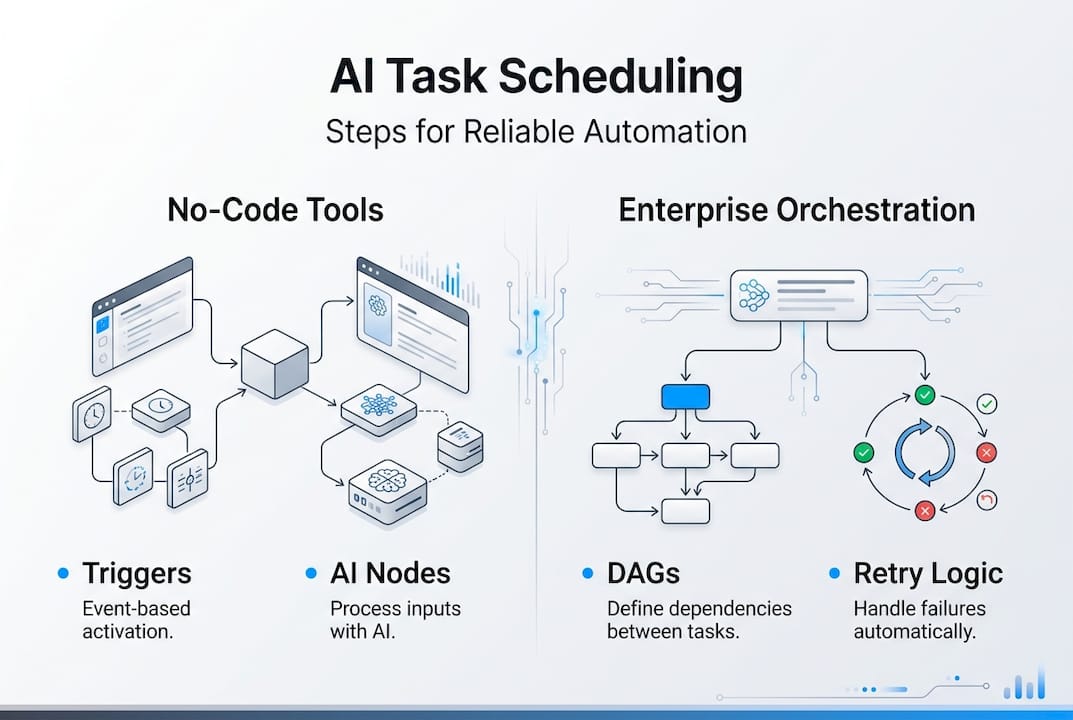
No-code platforms like Zapier, n8n, and Make.com let business professionals schedule AI tasks through triggers, AI nodes, and scheduled executions without writing a single line of code. For larger organizations, enterprise orchestration tools like Temporal, Domo, and IBM watsonx use DAGs (directed acyclic graphs) for task dependencies, retries, and governance.
| Scenario | Recommended tool type | Why |
|---|---|---|
| Solo operator or small team | No-code (Zapier, Make.com) | Fast setup, low cost |
| Growing business, custom logic | n8n (self-hosted) | Free, flexible, more control |
| Enterprise, multi-agent, compliance | Temporal, Domo, Airflow | DAGs, audit trails, reliability |
For a broader look at how automation fits your business, the AI automation guide on AgentsBooks covers the full picture. You can also explore agent workflow examples to see what's possible before you commit to a stack.
Pro Tip: Start with a no-code platform unless you have a specific need for advanced governance or multi-team dependencies. You can always migrate later, and starting simple means you'll actually ship your first automation this week.
Step-by-step: Scheduling AI tasks with no-code platforms
With your tools lined up, it's time to put them into action by scheduling your first AI-powered task. The process is more straightforward than most people expect.
- Choose your platform. Pick Zapier for the fastest setup and widest app library, Make.com for visual scenario building, or n8n if you want self-hosted control and a free tier. Check the platform workflow comparison to see how they stack up side by side.
- Connect your apps. Authenticate the services you want to automate. For example, link Gmail and Google Calendar so your workflow can read emails and create events.
- Add an AI node. Insert an AI action or agent node into your workflow. This is where the intelligence lives. You can configure it to classify emails, summarize content, or make routing decisions.
- Define your schedule. Set a cron trigger (every 15 minutes, daily at 8 a.m.) or an event trigger (fires when a new email arrives). Connecting apps and setting schedules like "every minute" or "daily" is how you control the automation's rhythm.
- Test and activate. Run a test execution to confirm the AI node behaves as expected, then activate the workflow.
| Platform | Ease of use | Cost | Flexibility | Best for |
|---|---|---|---|---|
| Zapier | Very high | Paid tiers | Moderate | Quick wins |
| Make.com | High | Free + paid | High | Visual builders |
| n8n | Medium | Free (self-host) | Very high | Developers, cost-conscious teams |
A practical example: connect Gmail to Google Calendar, add an AI node that classifies incoming emails as meeting requests, and schedule the workflow to check every 10 minutes. The AI creates calendar events automatically, with zero manual input. For a deeper walkthrough, see how to build AI workflow and configure AI decision nodes on the AgentsBooks blog.

Pro Tip: Use the visual editor in Make.com or n8n to map out your workflow before activating it. Seeing the full flow on screen catches logic errors that are easy to miss in list-based builders. Start with one simple workflow, get it running reliably, then layer in complexity.
For a more detailed automation setup, the AgentsBooks guide covers advanced configurations that go beyond the basics.
Scaling up: Enterprise-grade AI task scheduling and orchestration
While no-code tools take you far, larger teams and complex dependencies demand more robust orchestration. When your workflows involve multiple agents, conditional branching, or compliance requirements, you need tools built for that level of complexity.
Enterprise orchestration platforms use DAGs to map task dependencies visually and enforce execution order. Platforms like Temporal, Domo, and IBM watsonx add event-driven triggers, automatic retries, and full governance layers. This means if one task fails, the system retries it, logs the failure, and alerts the right person, without you watching a dashboard.
The business case is strong. Real-world AI scheduling benchmarks show 30% overtime reduction, 395 hours saved per year, projects completed 32% faster, and hybrid schedulers cutting response times by 26% while reducing deadline misses by 41%. Those numbers come from organizations that committed to proper orchestration, not just basic automation.
Key benefits of enterprise orchestration:
- Audit trails: Every task execution is logged, which matters for compliance and debugging.
- Retry logic: Failed tasks automatically re-run based on configurable backoff rules.
- Hybrid environments: Orchestrate tasks across cloud, on-premise, and third-party APIs from a single control plane.
- Multi-agent coordination: Assign subtasks to specialized agents and track their outputs as dependencies.
| Platform | DAG support | Retry logic | Governance | Best for |
|---|---|---|---|---|
| Temporal | Yes | Yes | Strong | Long-running workflows |
| Apache Airflow | Yes | Yes | Moderate | Data pipelines |
| Domo | Yes | Yes | Enterprise-grade | Business intelligence + AI |
For guidance on moving beyond basic setups, the scalable AI deployment guide and agent management strategies on AgentsBooks cover the transition in detail. You can also explore Temporal orchestration for a technical deep dive into long-running workflow management.
Common pitfalls and expert troubleshooting tips
Even the best setups can stumble. Here's how to avoid costly mistakes and maximize reliability.
The most overlooked issues in AI task scheduling include:
- Native scheduler glitches: ChatGPT's built-in scheduler and some Zapier automations have documented quirks that can cause missed or duplicate executions. Always verify with test runs.
- LLM rate limits: Language model APIs have request limits. If your workflow fires too frequently, you'll hit rate caps and get silent failures.
- Scope drift: The AI node gradually interprets its instructions differently over long runs, especially in multi-step workflows. This is subtle and dangerous.
- Missing escalation paths: If a task fails and no human is notified, the failure compounds silently.
- Cancellation propagation: When you cancel a parent task, child tasks may keep running unless your platform handles propagation explicitly.
"Edge cases like LLM rate limits, context drift, and implicit scope changes are the leading causes of unreliable AI scheduling in production environments."
Real-time scheduling best practices recommend building retry logic with exponential backoff, meaning the system waits progressively longer between retries rather than hammering the API. This alone prevents most rate-limit failures.
For a full breakdown of what can go wrong and how to fix it, the AI deployment pitfalls guide is essential reading. You can also find practical solutions in the AI agent management and managing AI at scale resources. Real-world AI agent case studies show how teams have resolved these issues in practice.
Pro Tip: Always monitor your scheduled workflows for scope drift. Set a checkpoint every 50 to 100 executions where a human reviews the AI's output against the original intent. Catching drift early saves hours of debugging later.
Why reliable AI task scheduling is easier and harder than it looks
Having explored the practical steps and potential roadblocks, let's put these tactics into perspective. Most guides make AI scheduling sound like a weekend project. And honestly, the first workflow usually is. You connect two apps, drop in an AI node, set a cron trigger, and it works. That early win is real.
But here's what those guides skip: the moment you add a second agent, a conditional branch, or a compliance requirement, the complexity multiplies fast. Validation becomes a job in itself. Governance isn't optional when real business data is flowing through automated pipelines.
The most important principle we've seen hold up across every scale is this: the orchestrator's role is to delegate and validate, never to execute code directly. When orchestrators start doing the work instead of managing it, you lose observability, and failures become invisible until they're expensive.
The teams that get the most from AI scheduling are the ones who treat it like infrastructure, not a shortcut. They invest in monitoring, build in human checkpoints, and resist the urge to automate everything at once. The scalability lessons from businesses that have done this well consistently point to the same thing: start narrow, validate thoroughly, then expand.
The technology is genuinely capable. The discipline to deploy it well is what separates teams that save 395 hours a year from teams that spend those same hours debugging broken automations.
Get started with AI agent scheduling
If you're ready to schedule smarter and gain hands-free productivity, here's where to go next.
AgentsBooks is built for exactly this kind of work. The AgentsBooks platform lets you create, configure, and deploy AI agents across your digital stack in three steps, no deep technical background required. You can set up task triggers, define schedules, and connect agents to the apps you already use.
For teams that need specialized intelligence, domain expert operators let you deploy agents trained for specific business functions, from content scheduling to customer follow-up. And if your workflows involve multiple agents working together, multi-agent team automation gives you the collaborative infrastructure to coordinate them reliably. The platform grows with you, from your first scheduled task to a full AI workforce.
Frequently asked questions
What are the main differences between Zapier, n8n, and Make.com for AI task scheduling?
Zapier offers fast setup with wide app support but limited flexibility, n8n is free and self-hosted for teams that want full control, and Make.com provides advanced visual scenario building for complex logic. Your choice depends on how much customization and cost control you need.
How much time can AI task scheduling actually save a business?
Real-world benchmarks show savings of up to 395 hours per year and 30% overtime reduction when AI scheduling is properly implemented. Results scale with the complexity and volume of tasks you automate.
How do I avoid missing deadlines or failed executions with AI scheduling?
Build in retry logic with exponential backoff, monitor executions regularly, and add human-in-the-loop escalation for critical workflows. Retries and escalation are the two most effective defenses against missed deadlines.
When should a business move from no-code tools to enterprise orchestration?
Once you need reliable task dependencies, large-scale automation, or formal audit trails, enterprise platforms like Temporal or Domo are the right move. No-code tools hit their ceiling when governance and multi-agent coordination become requirements.
What's the biggest pitfall in scheduling AI tasks?
Ignoring LLM rate limits, scope drift, and native glitches leads to silent failures that compound over time. Active monitoring and periodic human review are the most reliable safeguards.