
Most businesses struggle with inefficient manual workflows and overloaded teams that drain resources and limit growth. AI automation offers a transformative solution, delivering up to 50% efficiency gains and significant workload reduction. This guide walks you through practical, actionable steps to implement AI automation in your business, from assessing your needs and setting goals to building reliable workflows and optimizing ongoing performance. You'll learn how to identify high-impact automation opportunities, design dependable AI systems, and achieve measurable results that streamline operations and boost profitability.
Table of Contents
- Understanding AI Automation And Its Business Impact
- Preparation: Assessing Your Business Needs And Setting Goals For AI Automation
- Execution: Step-By-Step Guide To Building And Deploying AI Automation Workflows
- Verification And Optimization: Ensuring Reliability And Continual Improvement
- Discover Advanced AI Automation Solutions With Agentsbooks
- Frequently Asked Questions
Key takeaways
| Point | Details |
|---|---|
| AI automation drives efficiency | AI automation delivers 30-50% efficiency gains and enables businesses to handle complex judgment tasks at scale. |
| Agentic workflows boost margins | Early adopters report 40% revenue increases and 75% workload reduction per client through autonomous AI systems. |
| Preparation determines success | Auditing workflows, identifying automation targets, and setting baseline metrics are essential for reliable implementation. |
| Structured execution ensures reliability | Following a production pattern of Trigger, Preprocess, LLM, Tool calls, Postprocess, and Store/Log with validation at each step guarantees dependable automation. |
| Human oversight remains critical | AI handles 80% of execution while human review of 20% of outputs catches errors and maintains quality standards. |
Understanding AI automation and its business impact
AI automation represents a fundamental shift from traditional rule-based automation. While conventional systems follow rigid if-then logic, AI automation leverages machine learning models to adapt to new situations, handle unstructured data, and make judgment calls without explicit programming. This capability transforms how businesses approach repetitive tasks, customer interactions, and data processing.
The business impact is substantial. Enterprise AI automation delivers 30-50% efficiency gains across operations, enabling teams to focus on strategic work rather than manual processes. Companies adopting agentic-first AI workflows report 40% revenue increases and operate with high profit margins due to autonomous systems handling client work. Some businesses achieve 75% workload reduction per client, freeing capacity for growth without proportional headcount increases.
AI automation excels in three key areas:
- Processing unstructured data like emails, documents, and customer messages
- Making contextual decisions based on patterns and historical outcomes
- Scaling operations without linear cost increases
For digital marketing professionals, AI automation transforms campaign management, content creation, and performance analysis. An AI digital marketing agency can deploy autonomous agents to handle client reporting, ad optimization, and audience research simultaneously. This capability fundamentally changes service delivery economics.
Pro Tip: Start with one high-volume, low-complexity process to prove ROI before expanding automation across your organization. Early wins build stakeholder confidence and provide learning for more complex implementations.
"The difference between traditional automation and AI automation is like comparing a calculator to a strategic advisor. One follows instructions; the other interprets context and adapts."
Successful managing AI at scale requires thoughtful architecture, ongoing monitoring, and human oversight. The efficiency gains are real, but they demand structured implementation and continuous optimization to deliver sustained value.
Preparation: Assessing your business needs and setting goals for AI automation
Before deploying AI automation, you need a clear picture of where automation will deliver the highest impact. Start by auditing your current workflows to identify tasks that consume significant time, involve repetitive patterns, or require judgment based on data analysis. Document each process step, time requirements, error rates, and resource allocation.
The opportunity is significant. Roughly 50% of work activities are technically automatable with current technology. Focus on processes that meet these criteria:
- High volume with consistent inputs and outputs
- Require data interpretation or pattern recognition
- Consume disproportionate staff time relative to value created
- Have measurable quality or speed benchmarks
Common high-impact automation targets include invoice processing, customer service queries, content generation, data entry, report creation, and lead qualification. These tasks often involve unstructured data and contextual decisions that AI handles effectively.
Set specific, measurable goals aligned with business priorities. Vague objectives like "improve efficiency" lack accountability. Instead, define targets such as:
- Reduce invoice processing time from 4 hours to 30 minutes per batch
- Decrease customer query response time from 24 hours to 2 hours
- Lower data entry error rates from 8% to under 2%
- Increase content output from 10 to 40 pieces monthly without additional headcount
- Achieve 25% cost reduction in operational overhead within six months
Establish baseline metrics before implementation. Track current performance across time, cost, quality, and throughput for each targeted process. These benchmarks enable you to measure ROI accurately and identify optimization opportunities post-deployment.
Prepare your data infrastructure and governance framework. AI automation requires clean, organized data and clear human review processes. Identify data sources, assess quality, and implement validation protocols. Define who reviews outputs, approval thresholds, and escalation procedures for edge cases.
Pro Tip: Map out your ideal automation journey over 12 months, starting with quick wins that build momentum and ending with complex multi-step workflows that deliver transformational impact.
Configuring AI brains for business automation requires upfront planning around model selection, prompt engineering, and tool integration. Similarly, successful AI agent deployment depends on clear objectives and prepared infrastructure. Invest time in preparation to avoid costly rework and ensure your automation delivers measurable business value from day one.

Execution: Step-by-step guide to building and deploying AI automation workflows
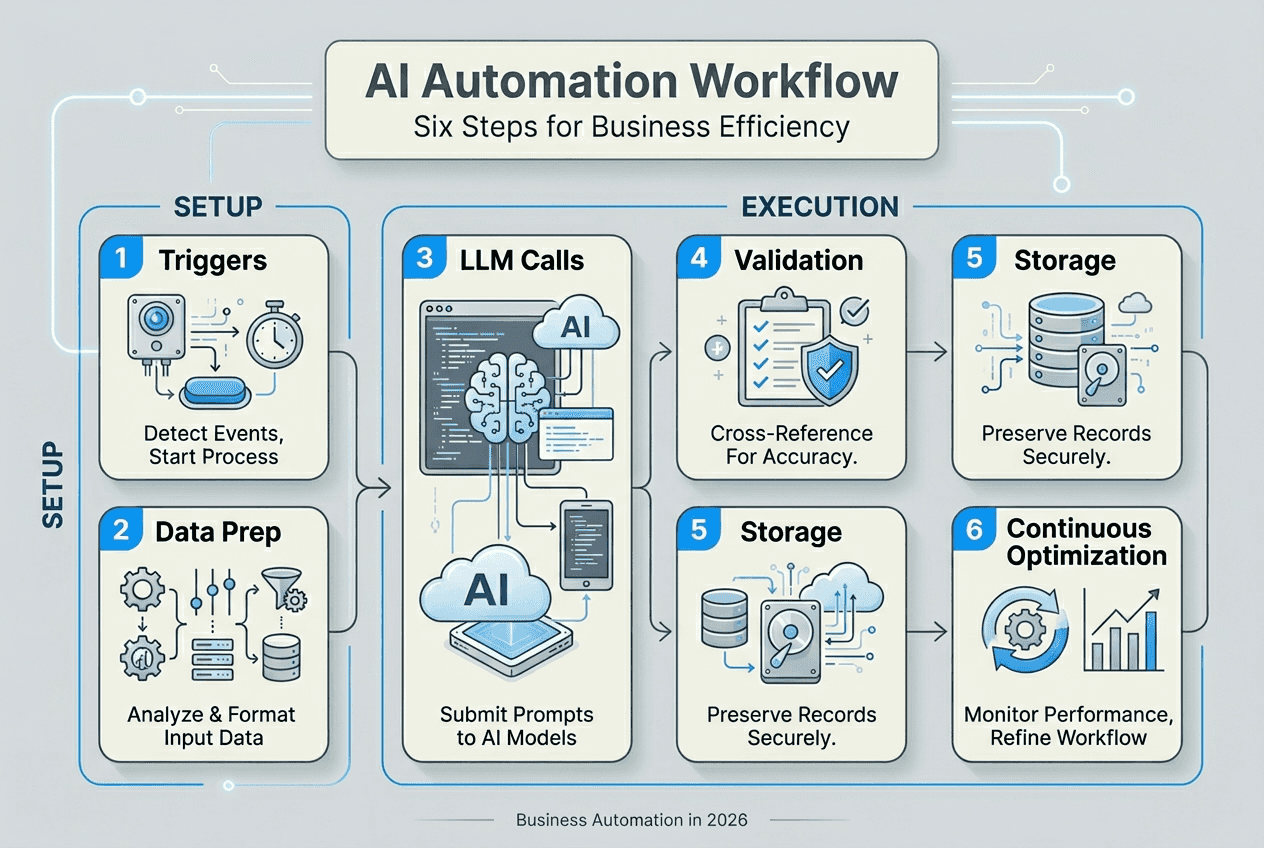
Building reliable AI automation requires a structured approach that ensures consistency, accuracy, and scalability. Follow this production pattern for dependable workflows: Trigger, Preprocess, LLM, Tool calls, Postprocess, Store/Log with strict validation at every boundary.
Step 1: Define triggers and inputs
Identify what initiates your automation. Triggers can be time-based schedules, incoming emails, form submissions, API webhooks, or database changes. Specify exactly what data the automation receives and in what format. Clear input definitions prevent downstream errors.
Step 2: Preprocess data
Clean and organize incoming data before AI processing. Remove duplicates, standardize formats, validate required fields, and enrich with contextual information. This step ensures your AI model receives consistent, high-quality inputs that improve output reliability.
Step 3: Incorporate LLM and tool calls
Design your AI interaction carefully. Craft prompts that provide clear instructions, relevant context, and output format specifications. Integrate tool calls for actions like database queries, API requests, or calculations. Large language models excel at interpretation and generation, while tools handle deterministic operations.
Step 4: Postprocess outputs
Validate AI-generated outputs against business rules and quality standards. Format results for downstream systems, apply additional transformations, and flag items requiring human review. This validation layer catches errors before they impact operations.
Step 5: Store results and log activity
Persist outputs to your database, CRM, or file system. Log every automation run with inputs, outputs, processing time, and any errors. These logs enable troubleshooting, auditing, and continuous improvement.
Step 6: Validate each boundary
Implement checks at every transition point. Verify trigger data completeness, preprocessing success, LLM output format, tool execution results, and final output quality. Validation prevents cascading failures and maintains reliability.
Choose between workflow and agent designs based on process complexity. Use workflows when you can explicitly map the process steps and decision points. Deploy agents only when the path is genuinely dynamic and unpredictable, then add guardrails to constrain behavior within acceptable boundaries.
| Design Pattern | Best For | Key Advantage |
|---|---|---|
| Workflow | Predictable multi-step processes | Explicit control and debugging |
| Agent | Dynamic problem-solving scenarios | Adaptability to novel situations |
| Hybrid | Complex processes with defined stages | Balance of control and flexibility |
Pro Tip: Build your first automation as a workflow even if you think an agent might work better. Workflows force you to understand the process deeply and identify edge cases before adding agent complexity.
Explore examples of autonomous agents in business workflows to see practical implementations across industries. Leverage tasks and triggers features to orchestrate complex automation sequences that respond to business events in real time. Start simple, validate thoroughly, and expand capabilities as you build confidence in your automation infrastructure.
Verification and optimization: ensuring reliability and continual improvement
Deploying AI automation is just the beginning. Sustained value requires ongoing verification, risk management, and performance optimization. Without these practices, automation drift leads to declining accuracy and eroding business value.
Implement human-in-the-loop reviews for critical outputs. AI agents handle 80% of execution while owners review 20% of outputs to catch errors and maintain quality standards. This balance leverages AI efficiency while preserving human judgment for edge cases and strategic decisions.
Continuously monitor these key areas:
- Data pipeline health and input quality metrics
- Model performance against baseline accuracy targets
- Processing time and throughput trends
- Error rates and failure patterns
- User feedback and satisfaction scores
Manage AI-specific risks proactively. Hallucination and prompt injection require governance and validation layers. Hallucination occurs when AI generates plausible but incorrect information. Combat this with fact-checking against trusted sources, output validation rules, and human review of high-stakes decisions. Prompt injection happens when malicious inputs manipulate AI behavior. Prevent it through input sanitization, output filtering, and strict permission controls.
Address shadow AI by establishing clear policies around approved tools, data handling, and deployment procedures. Unmanaged AI experimentation creates security vulnerabilities and compliance risks. Centralize AI governance while enabling teams to innovate within defined guardrails.
Track business impact through compliance and throughput metrics:
- Measure automation accuracy against quality standards
- Calculate time savings and cost reduction per process
- Monitor customer satisfaction and error resolution rates
- Assess employee productivity gains from freed capacity
- Evaluate ROI against initial investment and ongoing costs
Iterate workflow improvements based on output quality and business KPIs. Analyze logs to identify bottlenecks, recurring errors, and optimization opportunities. Refine prompts to improve output consistency. Adjust validation rules as you learn edge cases. Expand automation scope as confidence grows.
Pro Tip: Schedule monthly automation reviews where you examine logs, discuss team feedback, and prioritize improvements. Regular retrospectives prevent performance drift and surface optimization opportunities.
Leverage AI workforce management practices to coordinate multiple automation systems effectively. As you scale, AI multi-agent teams enable collaborative workflows where specialized agents handle distinct process steps and share information seamlessly.
Optimization is continuous. Market conditions change, business processes evolve, and AI capabilities advance. Build feedback loops that capture performance data, user insights, and business outcomes. Use this information to refine your automation strategy, enhance reliability, and maximize long-term value. The most successful implementations treat AI automation as a living system that requires ongoing attention, not a set-it-and-forget-it solution.
Discover advanced AI automation solutions with AgentsBooks
Ready to accelerate your AI automation journey? AgentsBooks provides a comprehensive platform designed specifically for business owners and marketing professionals seeking efficient, scalable automation solutions. Our AI domain expert operators automate complex workflows across marketing, operations, and customer service without requiring technical expertise.
The platform supports collaborative multi-agent teams that work together to handle sophisticated business processes. Create agents with specialized skills, configure tasks and triggers, and deploy across multiple platforms through an intuitive interface. Whether you're automating content creation, customer communications, or data analysis, AgentsBooks simplifies implementation while delivering enterprise-grade reliability. Start building your AI workforce today and experience the efficiency gains that leading businesses already enjoy.
Frequently asked questions
What types of business tasks are best suited for AI automation?
Tasks involving repetitive work, judgment calls, and unstructured data are ideal for AI automation. Common examples include invoice processing where AI extracts data from varied formats, customer service queries that require contextual understanding, content generation for marketing campaigns, lead qualification based on behavioral signals, and report creation from multiple data sources. The key is identifying high-volume processes where AI's pattern recognition and language capabilities add value beyond simple rule-based automation. Focus on tasks that consume significant staff time but follow consistent logic that AI can learn and replicate. Managing AI at scale becomes critical as you expand automation across your organization.
How can I ensure accuracy and reduce errors in AI automation workflows?
Implement human-in-the-loop verifications where team members review critical outputs before final delivery or action. Use structured validation at each automation stage, checking data quality after preprocessing, output format after AI generation, and business rule compliance before storage. Monitor model drift by comparing current performance against baseline accuracy metrics and retraining when degradation occurs. Maintain data quality through input sanitization, duplicate removal, and format standardization. Log every automation run to enable rapid troubleshooting when errors surface. AI workforce management practices help coordinate validation across multiple automation systems for consistent quality.
What are common challenges when implementing AI automation and how to overcome them?
Unmanaged shadow AI creates security and compliance risks when teams deploy automation without governance. Overcome this by establishing clear policies around approved tools, data handling procedures, and deployment protocols while enabling innovation within guardrails. Hallucination errors where AI generates plausible but incorrect information require fact-checking against trusted sources, output validation rules, and human review of high-stakes decisions. Hidden costs from inefficient prompts, excessive API calls, or poor architecture can erode ROI. Address these through careful design, cost monitoring, and optimization. Resistance to change often slows adoption. Combat this with early wins, transparent communication about job evolution rather than elimination, and training that builds AI literacy. Following a structured AI automation success blueprint helps navigate these challenges systematically.
How long does it typically take to see ROI from AI automation initiatives?
Quick wins from simple automation like email classification or data entry can deliver measurable time savings within weeks. More complex workflows involving multiple steps, integrations, and validation layers typically show ROI within three to six months as you refine processes and scale deployment. The key is starting with high-impact, manageable projects that prove value quickly, then expanding to more sophisticated automation as confidence and capabilities grow. Track both hard savings like reduced processing time and soft benefits like improved employee satisfaction from eliminating tedious work. Most businesses find that initial automation investments pay back within the first year, with compounding returns as they apply learnings to additional processes.