
Most businesses know they need AI agents in their workflows. The problem is that the path from "we should automate this" to a working, reliable system feels like a maze. Technical jargon, mismatched tools, and vague ROI promises slow everything down. The good news is that successful custom AI integration does not require a team of engineers or a six-figure budget. With a clear framework, even small teams can automate real processes, reduce manual work, and see measurable results. This guide walks you through every stage: setting goals, picking the right tools, building your integration, and validating that it actually works.
Table of Contents
- Determine your integration goals and requirements
- Choose the right tools, platforms, and frameworks
- Step-by-step process for custom AI integration
- Troubleshooting, optimization, and validation
- The overlooked keys to AI integration success
- Integrate smarter with AgentsBooks AI solutions
- Frequently asked questions
Key Takeaways
| Point | Details |
|---|---|
| Set clear goals | A successful AI integration starts with specific, measurable business objectives tailored to your workflows. |
| Choose suitable tools | Pick platforms and frameworks that match your technical capacity and automation needs for easier deployment. |
| Follow step-by-step integration | A structured, sequenced approach minimizes errors and makes the process repeatable for future automations. |
| Test and optimize continuously | Regular troubleshooting, user feedback, and validation are critical for long-term AI automation success. |
Determine your integration goals and requirements
Before you touch a single tool or write a line of configuration, you need to know exactly what you want to fix. Outlining clear automation goals is the first step to building effective AI agents. Skipping this step is the single most common reason integrations stall or fail entirely.
Start by mapping your existing workflows and identifying where time is lost. Repetitive data entry, slow customer response queues, manual report generation, and multi-step approval chains are all strong candidates for automation. Ask your team where they feel the most friction every week. Those answers are your starting point.
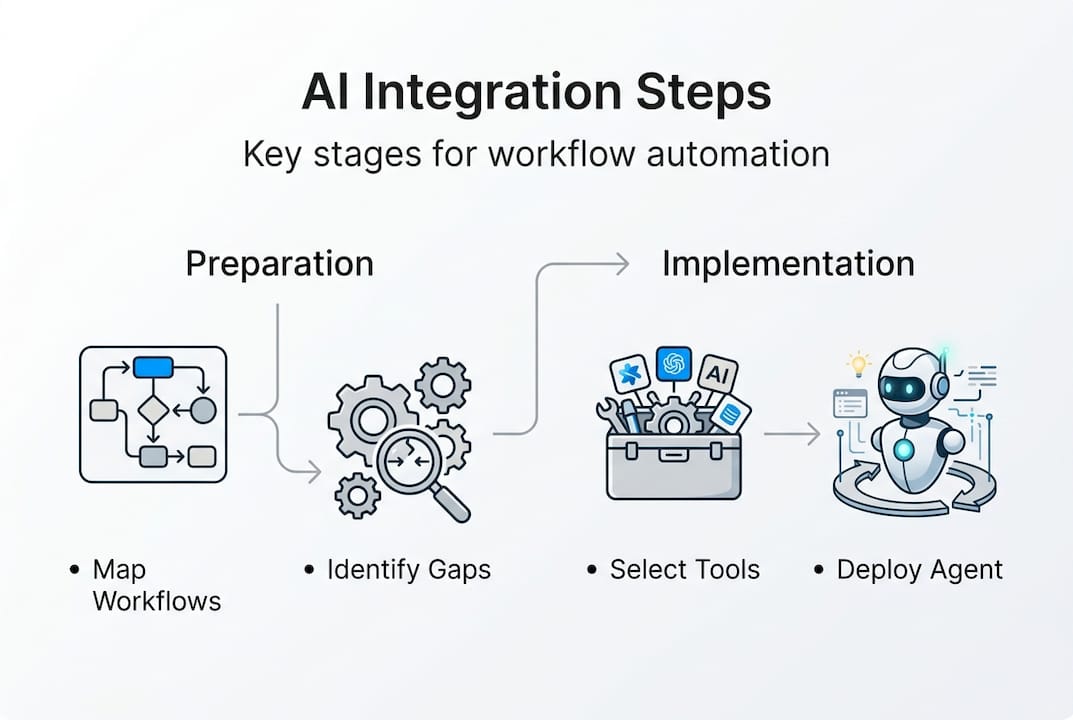
Once you have a shortlist of bottleneck processes, define what success looks like for each one. Vague goals like "make things faster" will not help you measure progress. Instead, set specific KPIs such as reducing average email response time from 4 hours to 30 minutes, or cutting weekly reporting time by 60%. These numbers give you a baseline and a target.
Also assess what data and tools you currently have. AI agents need access to your systems to work. Knowing your current stack, including your CRM, communication platforms, and cloud services, tells you what integrations you will need and where potential gaps exist. Staying current on AI workforce trends can also help you prioritize which processes are most ripe for automation right now.
| Goal | Automation target | Key requirement |
|---|---|---|
| Faster customer support | Auto-reply to common inquiries | CRM and email API access |
| Reduce manual reporting | Scheduled data pull and summary | Database and cloud storage access |
| Streamline lead qualification | AI agent scores and routes leads | CRM and calendar integration |
| Improve content scheduling | Auto-post across platforms | Social media API credentials |
Here are the core areas to assess before moving forward:
- Workflow bottlenecks: Which tasks take the most time and involve the least creative judgment?
- Data availability: Is the data your agent will need clean, accessible, and structured?
- Stakeholder buy-in: Who needs to approve this automation, and who will be affected by it?
- Compliance requirements: Are there data privacy or security rules that apply to this workflow?
Pro Tip: Focus on one or two high-impact use cases before attempting company-wide AI automation. A narrow win builds confidence and gives you a working model to replicate.
Choose the right tools, platforms, and frameworks
With your requirements clearly defined, you can now select the tools that match your team's skills and your automation goals. The right framework and platform can accelerate AI deployment and reduce barriers to entry significantly.
The first decision is low-code versus traditional development. Low-code platforms like AgentsBooks let you configure and deploy agents through visual interfaces and descriptive profiles, which is ideal for business users and non-developers. Traditional API-based solutions offer more control but require engineering resources. Most teams benefit from starting with a low-code platform and layering in custom API calls only where needed. Understanding API integration best practices becomes valuable as your integrations grow more complex.
| Platform | Key features | Ease of use | Best for |
|---|---|---|---|
| AgentsBooks | Agent creation, multi-LLM brains, triggers, multi-agent teams | High | Business users and developers alike |
| Zapier | Workflow automation, app connectors | Very high | Simple, app-to-app automations |
| Custom REST API | Full control, custom logic | Low | Engineering-led teams with specific needs |
| Make (Integromat) | Visual flow builder, advanced routing | Medium | Mid-complexity automations |
To evaluate whether a tool is the right fit, ask yourself these three questions:
- Can my team configure and maintain this tool without constant developer support?
- Does this platform support the specific integrations my workflow requires today, and in 12 months?
- What does scaling look like? Will costs or complexity spike as we add more agents or users?
Critical consideration: The tool you choose today will shape your automation architecture for years. Prioritize platforms with open APIs, active development, and strong documentation. Locking yourself into a closed ecosystem can limit your options as your AI strategy matures.
Also think about the AI brain powering your agents. Platforms that support multiple large language models, such as GPT and Claude, give you flexibility to match the right model to the right task. A customer-facing support agent may need a different model than an internal data analysis agent.
Step-by-step process for custom AI integration
Once you have your platform selected, it is time to build. Following a proven integration sequence reduces errors and promotes a smooth automation rollout. Here is a practical five-step process that works across most business contexts.
- Prepare your environment: Set up your platform account, connect your data sources, and configure access controls. Grant the agent only the permissions it needs for its specific task. Principle of least privilege applies here just as it does in traditional software security.
- Build a prototype: Use your platform's templates or a descriptive agent profile to create a basic version of your agent. Define its skills, knowledge sources, and behavioral rules. For creating AI workflows, starting from a template cuts setup time dramatically.
- Run a controlled pilot: Deploy the agent in a limited, real-world environment. This could mean running it for one team, one client segment, or one communication channel. Collect data on accuracy, speed, and any errors that surface.
- Deploy and monitor: Once the pilot results are positive, expand the rollout. Set up monitoring dashboards to track agent activity, task completion rates, and any anomalies. Automate alerts for failure events so issues are caught early.
- Create a feedback loop: Schedule regular reviews of agent performance. Gather input from the people who interact with the agent daily. Use that feedback to refine the agent's configuration, update its knowledge base, and improve its decision logic.
During the API setup phase, document every connection carefully. Note the endpoints used, the authentication method, and any rate limits. This documentation becomes essential when troubleshooting or onboarding new team members. Explore the AI automation step-by-step resources available to guide your team through each phase with specifics.
Pro Tip: Always pilot new AI workflows with a limited real-world test before wider rollout. A controlled test surfaces edge cases that sandbox testing misses, and it protects your operations from unexpected failures at scale.
Troubleshooting, optimization, and validation
After integration, continued success depends on systematic troubleshooting and iterative improvement. Systematic optimization and validation are essential for achieving long-term ROI with custom AI. Most teams underestimate how much ongoing attention a live agent requires in its first 60 days.

The most common errors fall into a few predictable categories. Authentication failures happen when API tokens expire or permissions change. Data mismatches occur when the format of incoming data does not match what the agent expects. Rate limit errors appear when your agent sends too many requests to an external service in a short window. Each of these has a clear fix once you know what to look for.
| Issue | Likely cause | Recommended fix |
|---|---|---|
| Auth failure | Expired or revoked API token | Rotate credentials and update agent config |
| Data mismatch | Schema change in source system | Update agent data mapping rules |
| API rate limit hit | Too many requests per minute | Add request throttling or batching logic |
| Incorrect agent output | Outdated knowledge base | Refresh knowledge sources and retrain |
| Agent not triggering | Misconfigured schedule or trigger | Review trigger conditions and test manually |
For ongoing validation, build these practices into your workflow:
- Automated testing: Run test cases against the agent weekly to catch regressions.
- Performance monitoring: Track task completion rate, error rate, and average processing time.
- User feedback collection: Create a simple channel for team members to flag unexpected agent behavior.
- Permission audits: Review what data and systems the agent can access every quarter.
Why this matters: Automation that is not monitored becomes a liability. An agent that was accurate in January may drift as your data, tools, or business rules change. Ongoing validation is what separates a sustainable automation from a one-time experiment.
For more advanced tuning, review your AI brain configuration tips to adjust model parameters, refine prompts, and improve response quality. As your automation program grows, lean on scalable AI deployment strategies to manage multiple agents without creating operational chaos.
The overlooked keys to AI integration success
Here is something most technical guides will not tell you: the biggest barrier to AI integration is rarely the technology. It is the human side of the rollout that trips teams up.
We see it consistently. Organizations spend weeks perfecting their agent configuration, then launch it without telling the people who will work alongside it. Adoption stalls. Workarounds appear. The agent gets blamed for problems that are actually communication gaps.
Overcomplicating the initial integration is equally damaging. Teams try to automate 12 processes at once, run into compounding issues, and lose confidence in the entire effort. The teams that succeed start narrow. They pick one workflow, get it working well, and celebrate that win loudly. That early momentum is what builds the organizational trust needed for deeper automation.
The hidden ROI: User adoption and continuous training generate more long-term value than any flashy feature. An agent that your team actually uses and improves over time outperforms a sophisticated agent that sits underutilized.
Treat your AI agent as a team member, not a background tool. Brief your team on what it does, what it cannot do, and how to flag issues. When people understand the agent's role, they work with it more effectively. For teams scaling beyond a few agents, resources on managing AI at scale offer practical frameworks for keeping everything coordinated.
Pro Tip: Celebrate small workflow wins early. When a team sees that the agent saved them three hours this week, they become advocates for the next integration, not skeptics.
Integrate smarter with AgentsBooks AI solutions
If you are ready to move from planning to building, the right platform makes all the difference. AgentsBooks gives you everything covered in this guide in one place: structured agent creation, configurable AI brains, multi-platform deployment, and built-in automation triggers.
You can start with agent creation features that let you build and configure agents from descriptive profiles, no coding required. For specialized needs, explore AI domain expert operators that bring deep, task-specific intelligence to your workflows. And when your automation strategy grows, AI multi-agent teams let you coordinate multiple agents working together toward shared goals. AgentsBooks is built for both business users and developers, so your whole team can contribute.
Frequently asked questions
What are the main benefits of custom AI integration for businesses?
Automating tasks with custom AI boosts operational efficiency by eliminating repetitive manual work and enabling faster, more consistent decision-making tailored to your specific workflows.
Do I need programming skills to integrate custom AI agents?
Low-code tools lower technical barriers to AI agent integration, so most professionals can configure and deploy basic agents using visual interfaces and prebuilt templates without writing code.
How can I ensure data security and privacy in AI workflows?
Secure platform setup is essential for compliant custom AI integration. Choose platforms with granular access controls and schedule regular audits of agent permissions and data flows.
What are common mistakes to avoid when integrating AI?
Focused, incremental automation prevents common AI rollout failures. Avoid automating too many processes at once and always validate agent behavior in a controlled test environment before full deployment.