
You have probably heard that AI triggers are complicated to set up and require deep technical knowledge. That is a common misconception. AI triggers are actually straightforward tools that detect specific events and start automated workflows, making them essential for businesses and developers seeking efficiency. This guide breaks down what AI triggers are, how they work with AI agents, and why they matter for your automation strategy. You will gain practical insights into leveraging triggers to enhance digital agent management and streamline operations without unnecessary complexity.
Table of Contents
- Understanding AI Triggers: What They Are And How They Work
- Types Of AI Triggers And Their Practical Applications
- Integrating AI Triggers With Agents To Automate Workflows Effectively
- Benefits And Challenges Of Using AI Triggers In Business Automation
- Enhance Your Automation With Agentsbooks AI Agent Solutions
- Frequently Asked Questions
Key takeaways
| Point | Details |
|---|---|
| AI triggers detect events | They monitor systems for specific conditions like incoming emails or API calls to initiate workflows automatically. |
| Triggers pass data to agents | Once an event occurs, triggers send relevant information to AI agents for intelligent processing and action. |
| They improve responsiveness | Automated event detection reduces delays and ensures consistent execution across business operations. |
| Understanding enables better deployment | Knowing how triggers work helps you design efficient AI agent systems and optimize automation strategies. |
Understanding AI triggers: what they are and how they work
AI triggers are mechanisms that detect defined conditions or events within your systems. When a trigger identifies something like an incoming email, a new database entry, or an HTTP request, it springs into action. The trigger captures relevant data from that event and passes it to an AI agent for processing. This handoff is where automation becomes intelligent.

Once the AI agent receives the data, it does not just execute a rigid script. The agent performs reasoning by analyzing the input, consulting large language models like GPT or Claude, and using external tools to determine the best course of action. This decision-making capability separates AI-driven automation from traditional rule-based systems. After reasoning, the agent executes specific actions such as sending a response, updating records, or triggering additional workflows.
Typical trigger examples include:
- New message arrival in a communication platform
- Data updates in a CRM or database
- System alerts from monitoring tools
- Scheduled time intervals for recurring tasks
- User actions like form submissions or button clicks
The beauty of this architecture is its flexibility. You can configure triggers to monitor almost any event that matters to your business. A customer service team might use email triggers to route inquiries to AI agents that draft personalized responses. A development team could set up API triggers that validate incoming data and update multiple systems simultaneously.
"The workflow process involves event detection by triggers, passing data to AI agents which then perform reasoning, use tools, and execute actions."
This creates a continuous cycle of detection, processing, and action that runs without manual intervention. Your systems become responsive to real-time events while maintaining the intelligence needed to handle complex scenarios. The trigger serves as the entry point, but the AI agent provides the brains behind each automated workflow.
Types of AI triggers and their practical applications
AI triggers come in several categories, each suited to different automation needs. Understanding these types helps you choose the right approach for your specific workflows and business requirements.
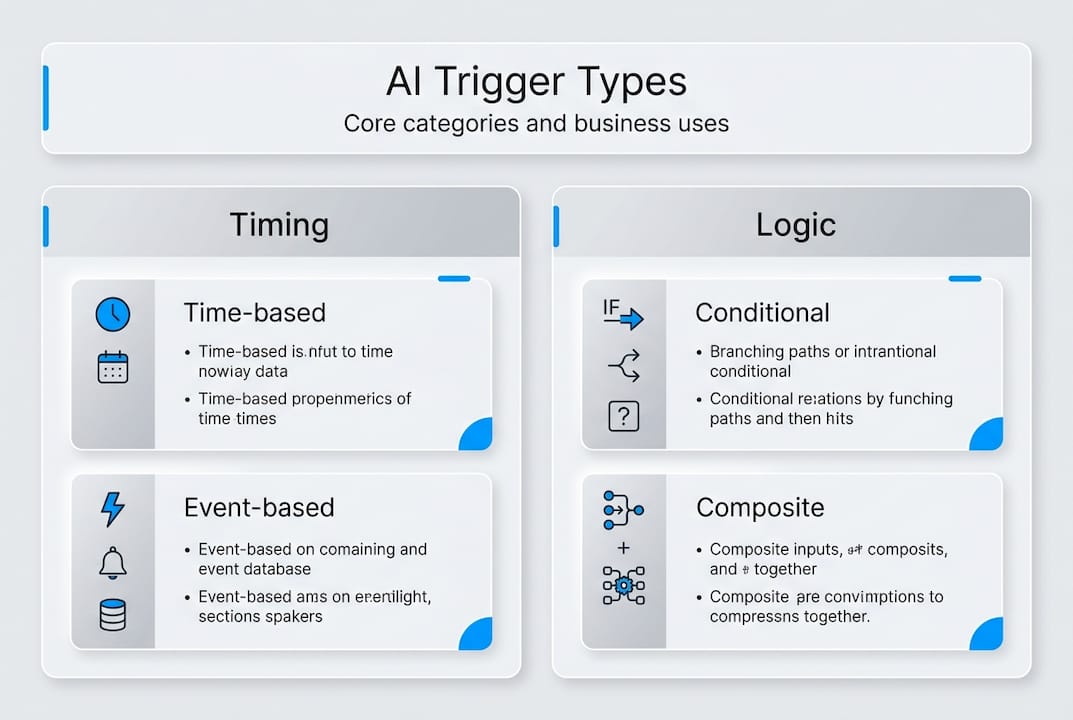
Time-based triggers operate on schedules. They fire at specific times or intervals, making them perfect for recurring tasks like generating daily reports, sending weekly summaries, or performing monthly data cleanups. You set the schedule once, and the trigger activates your AI agents automatically without any manual prompting.
Event-based triggers respond to specific occurrences within your systems. These detect events like incoming emails, API calls, database changes, or user actions. When the event happens, the trigger immediately passes relevant data to your AI agents. This real-time responsiveness makes event-based triggers ideal for customer support automation, order processing, and system integrations.
Conditional triggers fire only when data meets defined criteria. They evaluate incoming information against rules you specify, such as "trigger when order value exceeds $1000" or "activate if error rate crosses 5%." This selectivity prevents unnecessary workflow executions and focuses AI agent attention on situations that truly require action.
| Trigger Type | Best Use Cases | Example Scenario |
|---|---|---|
| Time-based | Scheduled reports, maintenance tasks | Generate sales summary every Monday at 9 AM |
| Event-based | Real-time responses, integrations | Process new support tickets as they arrive |
| Conditional | Threshold monitoring, smart routing | Escalate high-value leads to senior sales team |
Practical applications span numerous business functions. Customer support teams deploy email triggers that route inquiries to autonomous agents capable of understanding context and drafting appropriate responses. Data processing workflows use database triggers to synchronize information across multiple platforms, ensuring consistency without manual updates. IT operations leverage system alert triggers to detect anomalies and initiate diagnostic procedures before problems escalate.
Pro Tip: Start with event-based triggers for your highest-volume workflows. They deliver immediate ROI by automating repetitive responses and freeing your team to focus on complex tasks that require human judgment.
The key to effective trigger implementation is matching trigger types to your workflow characteristics. Recurring tasks benefit from time-based scheduling, while customer-facing processes need event-based responsiveness. Combining multiple trigger types creates sophisticated automation that adapts to various scenarios. For guidance on broader AI agent deployment, consider how triggers fit into your overall automation architecture.
Integrating AI triggers with agents to automate workflows effectively
Integration between AI triggers and agents follows a clear sequence that transforms detected events into completed actions. Understanding this process helps you design robust automated workflows that handle real business scenarios reliably.
Step 1: The trigger detects an event and captures necessary data. This might be an incoming email with subject line and sender information, an API call with payload data, or a scheduled time with relevant context parameters. The trigger packages this information for the AI agent.
Step 2: Data passes to the AI agent's reasoning module. The agent receives the trigger payload and begins analysis. It evaluates the information against its knowledge base, considers the current context, and determines what actions make sense given the situation.
Step 3: The agent utilizes internal tools and large language models to process the input. This is where event triggers hand over to intelligent processing. The agent might query databases, call external APIs, generate text using GPT or Claude, or perform calculations. These capabilities enable sophisticated decision-making beyond simple if-then rules.
Step 4: The agent executes an action based on its reasoning. Actions vary widely depending on your workflow design. Common examples include sending emails or messages, updating database records, creating tasks in project management tools, posting to social media, or triggering additional workflows for complex multi-step processes.
Step 5: Workflow results are monitored for optimization. Smart implementations track success rates, execution times, and error patterns. This data helps you refine trigger conditions, adjust agent reasoning parameters, and improve overall workflow performance.
| Integration Step | Key Consideration | Optimization Tip |
|---|---|---|
| Event detection | Define precise trigger conditions | Avoid overly broad criteria that cause false positives |
| Data handoff | Include all context agents need | Structure payload with clear field names and types |
| Agent reasoning | Configure appropriate LLM parameters | Test with real data to validate decision quality |
| Action execution | Handle errors gracefully | Implement retry logic and fallback procedures |
| Monitoring | Track meaningful metrics | Set alerts for unusual patterns or failure rates |
Pro Tip: Design triggers and agent actions with clear, testable criteria. Vague conditions like "handle customer issues" lead to inconsistent results. Specific criteria like "respond to billing questions with account balance and recent transactions" produce reliable, measurable outcomes.
Effective integration requires thinking about the entire workflow, not just individual components. Your triggers should capture data in formats your agents can process easily. Your agents need access to tools and knowledge bases relevant to their assigned tasks. Your monitoring systems must surface problems quickly so you can iterate and improve. This holistic approach to AI workforce management ensures your automated workflows deliver consistent business value.
When you streamline automation properly, triggers and agents work together seamlessly. The trigger acts as the vigilant observer, constantly monitoring for relevant events. The agent serves as the intelligent executor, applying reasoning and tools to complete tasks correctly. This partnership creates automation that adapts to varying situations while maintaining the reliability your business demands.
Benefits and challenges of using AI triggers in business automation
AI triggers deliver substantial advantages for businesses and developers implementing workflow automation. The most immediate benefit is faster response times. Traditional manual processes require someone to notice an event, decide on an action, and execute it. Triggers eliminate that delay by detecting events instantly and activating AI agents within seconds. This speed matters for customer-facing workflows where quick responses improve satisfaction and competitive positioning.
Consistent execution is another major advantage. Human operators vary in their approach, sometimes missing details or applying inconsistent logic. AI triggers fire reliably every time conditions are met, and the connected agents follow defined reasoning processes. This consistency reduces errors and ensures every customer, transaction, or event receives appropriate handling.
Scalability becomes achievable with trigger-based automation. Adding more manual workers to handle increased volume is expensive and slow. Deploying additional AI agents activated by triggers costs far less and scales almost instantly. You can handle ten times the workflow volume without proportionally increasing costs or complexity.
Key benefits include:
- Reduced manual monitoring requirements
- 24/7 operation without human supervision
- Immediate response to time-sensitive events
- Lower operational costs compared to manual processes
- Freed developer and staff resources for higher-value work
However, implementing AI triggers comes with challenges you need to address. Trigger misconfiguration is common when teams rush deployment without thorough testing. A trigger that fires too frequently overwhelms your agents and downstream systems. One that fires too rarely misses important events. Finding the right balance requires careful analysis of your actual event patterns and workflow requirements.
False positives create noise and waste resources. If your trigger conditions are too broad, agents process events that do not actually require action. This consumes compute resources and potentially generates unwanted outputs like duplicate messages or unnecessary updates. Precise trigger criteria and robust testing minimize false positives.
Complex dependency handling poses difficulties in sophisticated workflows. When one trigger activates multiple agents, or when agent actions create new events that fire additional triggers, you must manage these chains carefully. Poor dependency design leads to infinite loops, race conditions, or workflows that fail partway through without clear error messages.
"AI triggers enable efficiency and responsiveness but require careful setup to avoid workflow bottlenecks and errors."
Mitigation strategies address these challenges effectively. Thorough testing in staging environments catches configuration issues before production deployment. Clear workflow design with documented trigger conditions and expected agent behaviors makes troubleshooting easier. Monitoring systems that track trigger frequency, agent execution times, and error rates help you spot problems quickly and optimize performance.
Businesses that implement AI triggers properly gain competitive advantages. Operations run more efficiently with lower costs. Customer experiences improve through faster, more consistent service. Developer teams focus on building new capabilities instead of maintaining manual processes. These benefits compound over time as you refine your automation and expand trigger-based workflows across more business functions.
For organizations managing AI workforce efficiency, triggers are foundational infrastructure. They enable the event-driven architecture that makes AI agents truly autonomous. Success requires balancing the power of automation with thoughtful design and ongoing optimization. When you get it right, AI triggers transform how your business operates and deliver measurable ROI through improved efficiency and responsiveness. Exploring business workflow examples can provide inspiration for your own implementations.
Enhance your automation with AgentsBooks AI agent solutions
Ready to implement AI triggers without the complexity of building everything from scratch? AgentsBooks provides a complete platform for creating, configuring, and deploying AI agents with sophisticated trigger capabilities. You get access to a turnkey AI agents factory that lets you customize triggers and workflows to match your exact business requirements.
The platform supports multi-agent collaboration, enabling you to design complex automation scenarios where multiple AI agents work together, triggered by different events and coordinating their actions. This capability is essential for enterprise workflows that span multiple systems and departments. AI multi-agent teams handle sophisticated processes that single-agent systems cannot manage effectively.
AgentsBooks includes AI domain expert operators that provide real platform integrations, not just generic API connections. These specialized operators understand the nuances of popular business tools and ensure your triggers and agents work seamlessly with your existing technology stack. You save months of development time and avoid integration headaches.
Pro Tip: Leverage AgentsBooks to accelerate your AI agent deployment timeline. The platform handles infrastructure, security, and scaling so you can focus on designing workflows that deliver business value. Join thousands of businesses already boosting efficiency with AgentsBooks technology and proven automation frameworks.
Frequently asked questions
What are common use cases for AI triggers?
AI triggers automate notifications by detecting events like system alerts or customer actions and immediately informing relevant teams or individuals. They enable data synchronization across platforms, ensuring information stays consistent without manual updates. Customer support tasks benefit significantly, with triggers routing inquiries to appropriate AI agents that draft responses or escalate complex issues. System monitoring uses triggers to detect anomalies and initiate diagnostic workflows before problems impact users. These examples of autonomous agents demonstrate how triggers reduce manual involvement in routine workflows while improving response times and consistency.
How do AI triggers differ from traditional automation triggers?
Traditional automation triggers execute predefined actions based on simple rules without adaptation or learning. AI triggers integrate with intelligent agents capable of reasoning about context, learning from patterns, and making nuanced decisions. This allows for adaptive workflow execution that responds appropriately to varying situations rather than following rigid scripts. When an AI trigger fires, the connected agent evaluates the specific circumstances and chooses actions based on current context, not just static rules. This context-aware processing handles edge cases and complex scenarios that break traditional automation.
What technical skills are needed to implement AI triggers?
Basic understanding of APIs, event-driven programming, and AI agent frameworks helps you design effective trigger-based workflows. Familiarity with JSON for data structures and HTTP protocols for integrations is useful. However, platforms like AgentsBooks simplify implementation significantly with low-code tools and pre-built integrations. You can configure sophisticated triggers and agents through visual interfaces without writing extensive code. This approach reduces technical barriers and lets business users participate in AI agent deployment alongside developers. Teams with mixed skill levels collaborate effectively when using platforms that balance power with accessibility.
Can AI triggers integrate with existing business platforms?
Yes, AI triggers work with most popular business platforms through standard APIs and middleware connections. Common integrations include email systems, CRM platforms, project management tools, databases, and communication channels. The key is ensuring your AI agent platform supports the specific integrations you need. Expert operators provided by platforms like AgentsBooks specialize in connecting AI agents to real business systems, handling authentication, data formatting, and error handling. These AI domain expert operators understand platform-specific requirements and ensure reliable integration without requiring deep technical expertise from your team. This makes enterprise-grade automation accessible to organizations of all sizes.